
Git - How to extract file differences between two commits and package them into zip in Windows git environment
- Giko
- Technology
- March 20, 2020
Table of Contents
Background
I have been using Git for work for a while. Although colleagues recommend using the command line directly, I still prefer UI interfaces. In the SVN era, extracting changed files between two commits was a common operation. After switching to Git, I have been wondering how to achieve this command. Although I have seen various methods, none matched my usual workflow. Recently I discovered a new approach, so I am organizing it here for everyone’s reference.
Commonly found methods via Google
TortoiseGit has a built-in feature to export selected files from the log view
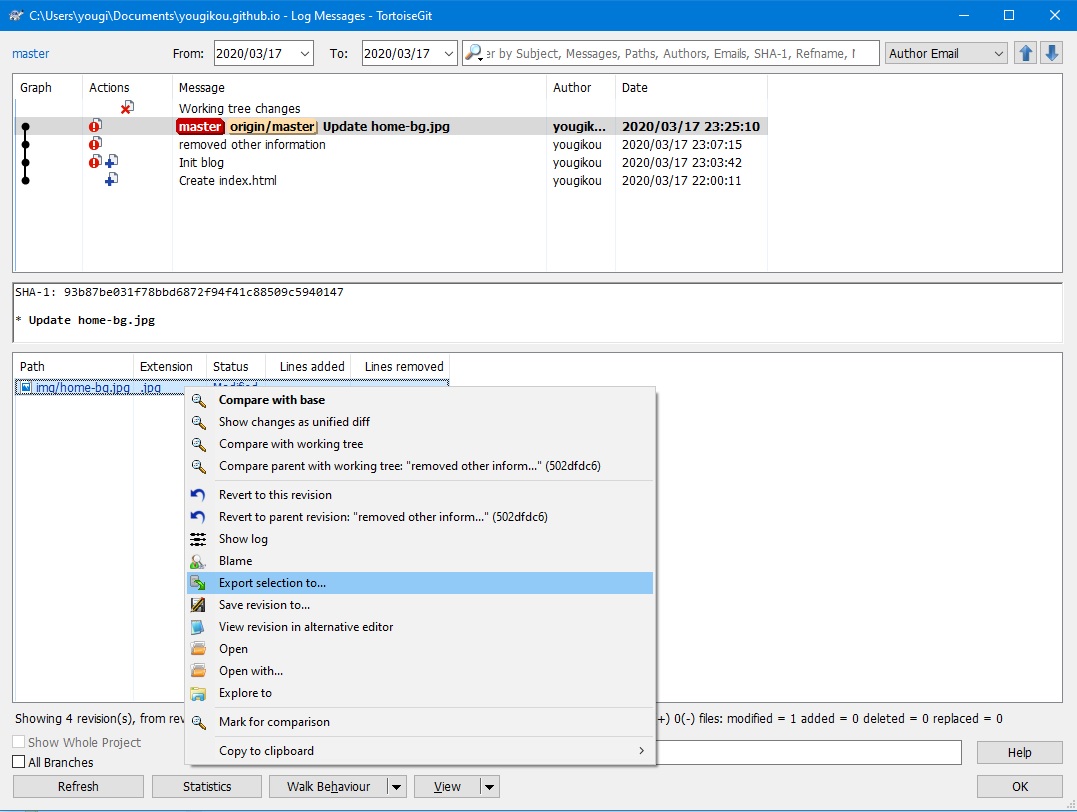 This feature is convenient for extracting files from a single commit, but not for cumulative changes across multiple commits. Selecting two commits in the log view is completely different from SVN—you simply cannot see the files. Although there are articles introducing this trick, due to this limitation, it’s… not perfect.
Windows batch I used this method for a while, written by a Japanese developer. The principle is to loop through the results of git diff and copy files one by one. It can be set up in SourceTree’s Custom Actions for direct use. I can no longer find that person’s blog, so I won’t link it. Moreover, this method has a drawback! In Windows environment, file paths have length limits. In many projects with deeply nested folders, you may encounter “file not found” issues. Of course, starting from Windows 10, this restriction can be removed via group policy—but this proves that not everyone can configure it successfully in different environments, so… not perfect.
Shell script
Git diff $sha1 $sha2 --name-only | xargs tar -zcvf update.tar.gzThis is a command line method, most common in Linux. It works well indeed. After installing Git’s built-in Linux tools on Windows, there are no issues using it. But copying SHA values each time is tedious, and the tar compression method feels awkward on Windows, requiring 2 steps to extract… not perfectSourceTree’s native functionality is not worth mentioning—it can only Archive the entire project state, which is too cumbersome.
Key points and solutions
How to pass selected SHA values from GUI operation SourceTree’s Custom Actions provide this feature, allowing $SHA to be passed to Script.
How to make SourceTree’s Custom Actions execute bash shell script This is the most crucial point, but when I was searching for this solution, no article mentioned it. I stumbled upon the answer in a completely unrelated article. Configuration as follows, Git is something everyone installs, bash is automatically included.
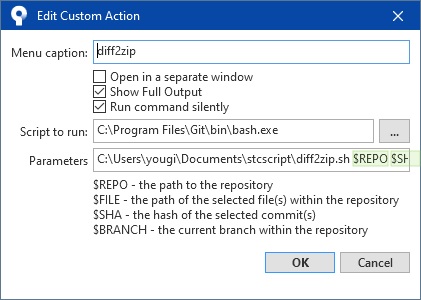
This way we can use convenient shell commands on Windows to extract changed files between two commits and package them simultaneously. But there is still the question of how to package into zip—Windows itself doesn’t have commands for this. Git’s Linux tool package includes unzip and tar, but not zip. (There’s a small episode about this: I have two computers, one with zip command, one without. At first I couldn’t figure out what I installed differently that caused this discrepancy. It took me a long time to discover that Oracle database installation directory’s bin actually contained zip.exe… okay)
The key is that online I could only find the project (Info-ZIP) source code, but couldn’t find compiled zip.exe to copy and use. Friends in need can download directly here (zip.exe.zip). Place it in Git’s Linux tool package path (Git\usr\bin) to use directly like other commands.
Below is the shell script itself—once understood, it’s nothing special. Reference if needed.
$Repo is not mandatory; when executed in SourceTree, the current folder is automatically the project root directory.
   # use parameter -> $REPO $SHA
   repo=""
   sha1=""
   sha2=""
   if [ -n "$1" ] && [ -n "$2" ] && [ -n "$3" ] && [ -z "$4" ]; then
   repo=$1
   sha1=$3
   sha2=$2
   echo "Repository is ${1}."
   echo "Current path is ${PWD}."
   echo $2
   echo $3
   # git diff --diff-filter=ACM $sha1 $sha2 --name-only | xargs tar -czvf update.tar.gz
   git diff --diff-filter=ACM $sha1 $sha2 --name-only | xargs zip -r ./update.zip
   else
   echo "please select two commit"
   fi
   exit
Supplement: Adding –diff-filter=ACM limits changes to added/changed/modified files, because deleted files naturally cannot be found during packaging. You can check logs or add this option to exclude them beforehand.
I don’t know how many friends like me still use Windows as the main development environment and have the above requirements. I searched for a long time without finding a perfect solution. This method is what I consider relatively complete, provided for reference. Haven’t written for over ten years, writing just this much makes me tired :-O